HAYCONEX

Free initial estimate · projects from 3,500 €

Hotel Wi‑Fi in Barcelona with fewer guest complaints this season

If Wi‑Fi fails in rooms, reception or common areas, we review the current network and suggest an installable solution with estimated cost, timing and local support.

Technical reply during working hours. With 4 details we can suggest the next step.

Scope used for the estimate

  • Fewer complaints about drops and low speed
  • Room and common-area coverage
  • Separated guest and staff networks
  • Invoice, documentation and local support
REAL ARTIFACT 01HAYCONEX / HOTEL
A real hotel network topology, anonymized to hide names, IP addresses and private data.

What you get before any site visit

01Initial estimate
Approximate cost by size, zones and urgency.
02Work plan
What to check, what to install and what can wait without buying extra equipment.
03No mandatory visit
If details are missing, we ask only for the one useful detail.

Quick request

4 questions to suggest the next step

One question at a time. At the end we show an estimate and ask for a contact.

Step 1 of 4

What type of accommodation do you have?

Real proof

How we check hotel Wi-Fi before making promises

We do not start with a generic equipment list. We look at the rack, topology, guest zones and before/after measurements. This example is anonymized: client names, IPs and private data are not published.

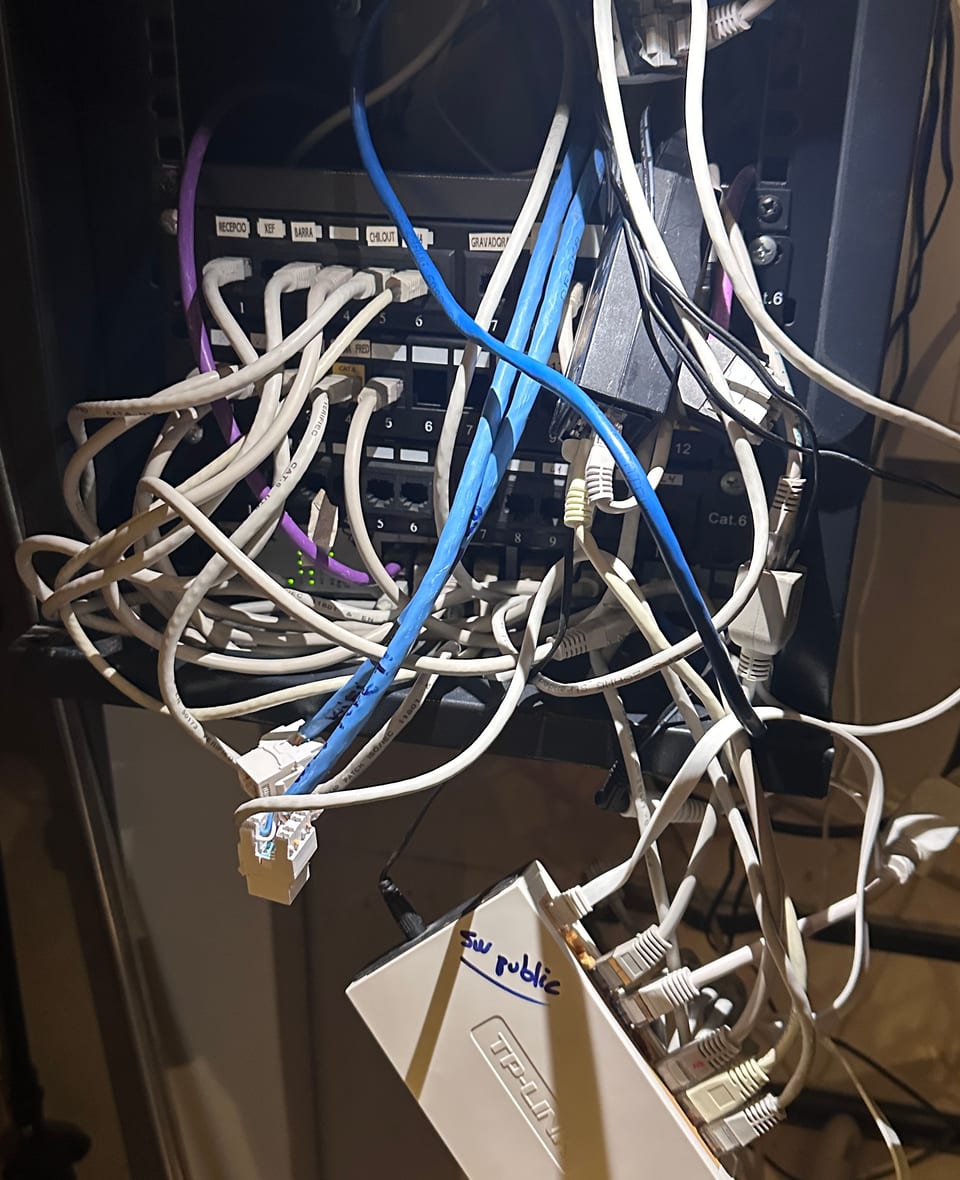
Network rack in a hospitality site before Wi-Fi cleanup
Situation: a rack where the network had grown in layers
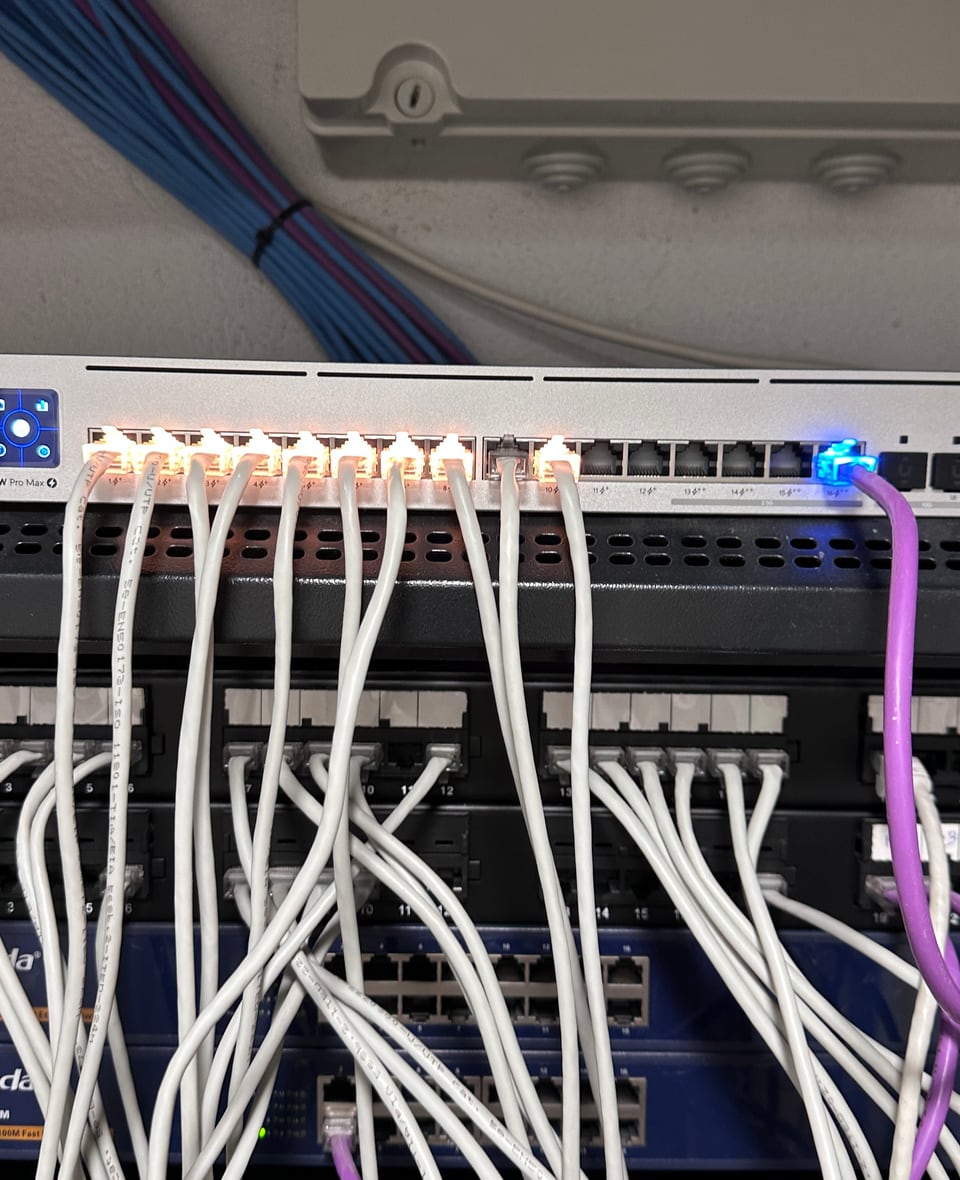
Switch and patch panel in a hospitality site
Action: ports and devices identified and organized
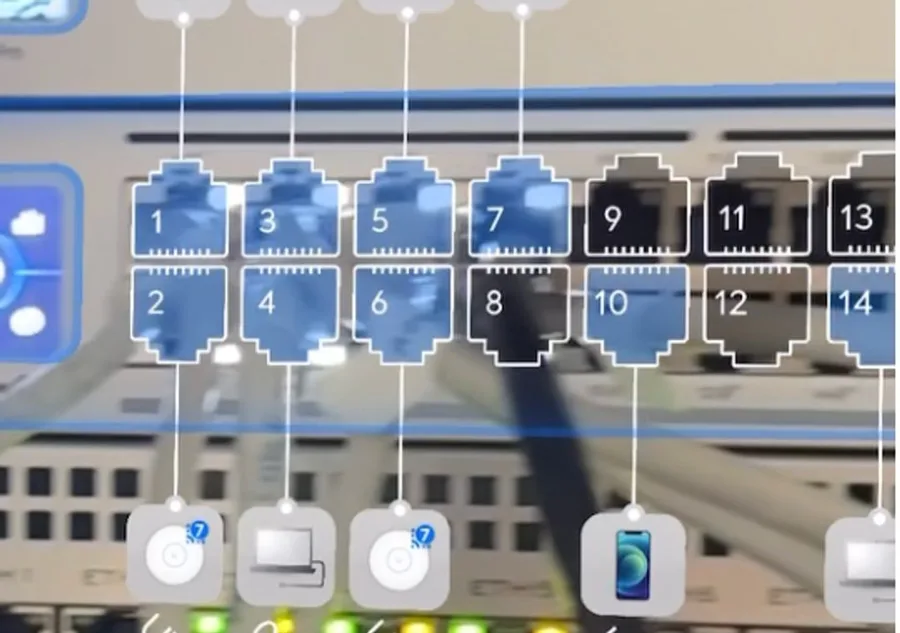
Anonymized Wi-Fi port and device map
Handover: anonymized port map for maintaining the network

6.87 -> 360.95 Mbps

download in one zone after fixing network and equipment

51.98 -> 680.12 Mbps

second real measurement after the adjustment

25-27 ms

latency in measurements after the work

5 days

design, equipment, configuration and launch

What becomes clear for the owner

✓Where the bottleneck is: provider, cabling, switch, access point or configuration.
✓Which networks must be separated: guests, staff, cameras, PMS, POS or administration.
✓What can be improved quickly and what should be planned in phases.
✓Which results can be checked with measurements and a documented topology.
Review my site
“Before their work we had a lot of Wi‑Fi complaints. Afterwards, practically zero. Today our network is state of the art.”
Hotel director, Barcelona
We work withUbiquiti UniFi

When it is time to upgrade accommodation Wi‑Fi

The need usually appears through guests, reception and management. Hayconex turns those signals into a clear plan with an estimated price, timing and responsibility.

Slow Wi-Fi can be the only complaint in an otherwise good review

On Tripadvisor and Booking, guests mention slow Wi-Fi as a reason to lower their score, even when the rest of the stay was good.

Common areas are part of the guest experience

Lobby, restaurant, terrace, pool and meeting areas need planned coverage.

Staff need their own access

Reception, POS, cameras, PMS and work devices are safer in a separated part of the network.

The network grew in pieces

Routers, repeaters and several passwords can become one manageable structure.

Before the season, it helps to have a plan

Management receives an initial estimate, expected work and a clear way to move forward.

What you have after installation

Coverage in key areas

Rooms, corridors, lobby, restaurant, terraces and staff areas are included in the work plan.

Clear guest access

Guests connect according to the hotel rules: password, QR or a basic branded access page.

Separate staff access

Reception, POS, cameras and work systems stay in a separated part of the network.

Documentation for ownership and management

After installation you keep the network diagram, equipment list, access details and recommendations.

Support after installation

Hayconex can support the network: health review, changes and recommendations before the season.

How the project runs

1

You answer a few simple questions

Business type, size, main problem and contact.

2

Alex and Sam, the founders, review your case

We tell you if a remote review is enough, if a visit is needed, or if a proposal can already be prepared.

3

We agree on the work plan

We agree on equipment, timing, work zones and support format.

4

Launch and documentation

After launch you receive the network diagram, access details, recommendations and support option.

Examples of accommodation projects

Hotel

Hotel in Platja d'Aro

Initial situation

The hotel needed to upgrade Wi‑Fi in rooms, common areas and outdoor spaces.

Result

Launch in 5 days. Real measurement after the network upgrade: 300+ Mbps.

How we confirm the result

Speed measurement
Zone diagram
Network report

Privacy

Examples and measurements are shown without sensitive site or guest data.

Work done

  • Coverage plan by zones
  • Equipment installation and configuration
  • Guest access and staff access
  • Documentation and support after installation

Format

5 days

Measurement: 300+ Mbps

Aparthotels

6 aparthotels in Barcelona

Initial situation

Several sites needed one approach for access, management and support.

Result

Management received a clearer view of network status and maintenance.

How we confirm the result

Speed measurement
Zone diagram
Network report

Privacy

Examples and measurements are shown without sensitive site or guest data.

Work done

  • Common structure for several sites
  • Guest access and staff access
  • Support channel

Format

Single system

Modernization

Accommodation with an old network

Initial situation

The network had grown in pieces: several devices, several passwords and unclear responsibility.

Result

The network became clearer for ownership, management and technical support.

How we confirm the result

Speed measurement
Zone diagram
Network report

Privacy

Examples and measurements are shown without sensitive site or guest data.

Work done

  • Review of the existing structure
  • Transition plan by zones
  • Guest access and separated work network
  • Technical documentation

Format

Project by zones

How much it can cost to improve hotel Wi‑Fi

Mediocre Wi‑Fi has a price

Let's run the numbers.

−0.3 pts

off your average Booking score: the typical penalty Wi‑Fi complaints leave in reviews.

~€19,000/year

what a 20-room hotel (€90/night, 70% occupancy) can stop earning if that drop holds.

Modernising the whole network usually costs less than a single year of that loss.

Mechanism backed by Cornell University (Center for Hospitality Research, C. Anderson): improving online reputation raises RevPAR by up to +1.42% per reputation-index point for midscale hotels. Illustrative calculation.

Tourist apartments / small accommodation site

from 1,500 €

  • For 1–10 apartments or a small lodging site
  • Guest access
  • Basic setup and remote management
Common

Hostel / boutique hotel

from 3,500 €

  • 10–30 rooms
  • Coverage by zones
  • Guest access and staff access
  • Documentation and launch

Hotel / aparthotel 30+ rooms

from 7,500 €

  • Project by floors and zones
  • Separated access for guests and staff
  • Documentation and support after launch

Support after installation

from 250 €/month

  • Network health review
  • Changes on request
  • Recommendations before the season

These are reference prices to decide whether it is worth talking. The final amount depends on the building, cabling, zones, current network and scope of work.

Can also be included

Initial review by WhatsApp and a technical visit if needed.

Video surveillance and service networks can be included in the same project.

Our guarantee

Speed guarantee

We guarantee the project speeds in the agreed zones. If they are not met, we come back at no cost until they are.

30-day priority support

After launch, 30 days of priority support for adjustments and questions.

We run 2–3 projects at a time so every installation gets done right. To secure your slot before high season, get in touch now.

One site, one manageable Wi‑Fi system

!Network built in pieces
Operator router
Floor 1
covered zone
Floors 2–3
to review
Floor 4+
limited visibility
⚠️

Several devices, passwords and areas with little visibility

✓Manageable Wi‑Fi system
Router / firewall

Guest network

Fl. 1

Fl. 2

Fl. 3+

Staff network

PMS, telephony, POS

Cameras by cable

PoE

✅

Coverage by zones, separated networks and support

In a lodging site, Wi‑Fi works as infrastructure: access points, switches, guest network, staff network, service devices, monitoring and support.

Hayconex brings these parts into one clear system that can be maintained and expanded: zone coverage, PoE power, access rules, documentation and support after installation.

The internet provider can stay the same. We work with the internal building network and suggest operator changes only when they add value.

Which lodging types it fits

Tourist apartments

Wi‑Fi for one or several apartments, remote management and clear guest access.

Hostels and boutique hotels

Coverage in rooms, reception, common areas and service spaces.

Hotels and aparthotels 30+ rooms

A zone-based project: floors, common areas, staff access, service devices and support.

Properties with an old network

Routers, repeaters and several passwords become one clear, manageable structure.

What changes when the network is designed for business

Less uncertainty before spending

With 4 details we give an initial estimate and explain which options make sense.

One technical owner

You speak with an engineer from the first message to handover.

Network designed for daily operations

Guests, customers, staff, POS, cameras and voice are separated by priority.

Verifiable handover

You receive a diagram, access details, recommendations and documented responsibility zone.

Support after launch

A direct channel for changes, questions and failures without starting from zero.

Frequently asked questions

How do you know how much equipment is needed?
It depends on rooms, floors, walls, common areas and the current structure. Approximate details are enough for the first step; the final design is confirmed after reviewing the site.
How long does the project take?
Most installations in hotels and hostels are completed in 3–5 days. Larger projects (30+ rooms) can take 1–2 weeks. We work by areas so the accommodation can keep operating.
Can the work be done while the hotel is open?
Yes. Work is planned by areas and timing so the hotel can keep operating.
Can part of the current equipment stay?
Yes, when it fits the new structure and supports the required management level. We decide this after reviewing the site.
Which equipment brands do you use?
We choose equipment by goal and budget. UniFi fits many small and medium lodging sites. For higher requirements, Aruba or Ruckus can be considered.
What remains after the project?
Network diagram, equipment list, access details, recommendations and a support channel.
Do you work with an invoice?
Yes. Hayconex works through Hay Conexion S.L. in Spain and issues invoices.

Request an initial estimate for your site

Send a short description, a router photo or a floor plan. We will tell you whether the issue needs configuration, cabling, access points or support.

We reply during working hours: Mon-Sat, 9:00-20:00.